I’ve learned through experience that there’s a fundamental truth about AI-assisted development: AI enforcement is not assured.
You can write the most detailed skill file. You can craft the perfect system prompt. You can set up MCP servers with every tool imaginable. But here’s the uncomfortable truth: the AI decides whether to follow any of it.
That’s not enforcement. That’s hope.
TL;DR: LLMs are probabilistic and can’t guarantee workflow compliance. Skills and MCP tools extend capabilities but don’t enforce behavior. Claude Code Hooks solve this by providing deterministic control points—SessionStart, PreToolUse, and PostToolUse—that ensure critical actions always happen. As AI-generated code scales, you need automated validation systems that codify architectural rules, business constraints, and design patterns. Workflow orchestration must live outside the AI.
The Fundamental Problem: LLMs Are Probabilistic, Not Deterministic
LLMs are probabilistic, not deterministic. When you tell Claude to “always read the skill file first” or “always call this MCP tool before responding,” you’re giving it a suggestion. A strong suggestion, maybe. But still a suggestion.
| |
I’ve seen this play out repeatedly. The AI might:
- Think it already “knows” how to do something
- Interpret the task as not requiring the skill
- Shortcut due to context length pressure
- Simply… not follow the instruction 5% of the time
That 5% might seem small until you’re running autonomous agents in production.
Why Skills and MCP Aren’t Enough
Don’t get me wrong—skills and MCP servers are valuable. They extend what the AI can do. But they don’t control what it will do.
Consider this scenario:
- You create a detailed skill file with your deployment workflow
- You set up an MCP server with deployment tools
- You tell the AI to “follow the deployment skill”
- The AI decides it knows better and skips step 3
The skill existed. The MCP tool was available. The AI chose not to use them. Where’s your enforcement?
This isn’t a bug in the AI. It’s a fundamental architectural mismatch. You’re asking a probabilistic system to provide deterministic guarantees.
The Architectural Principle
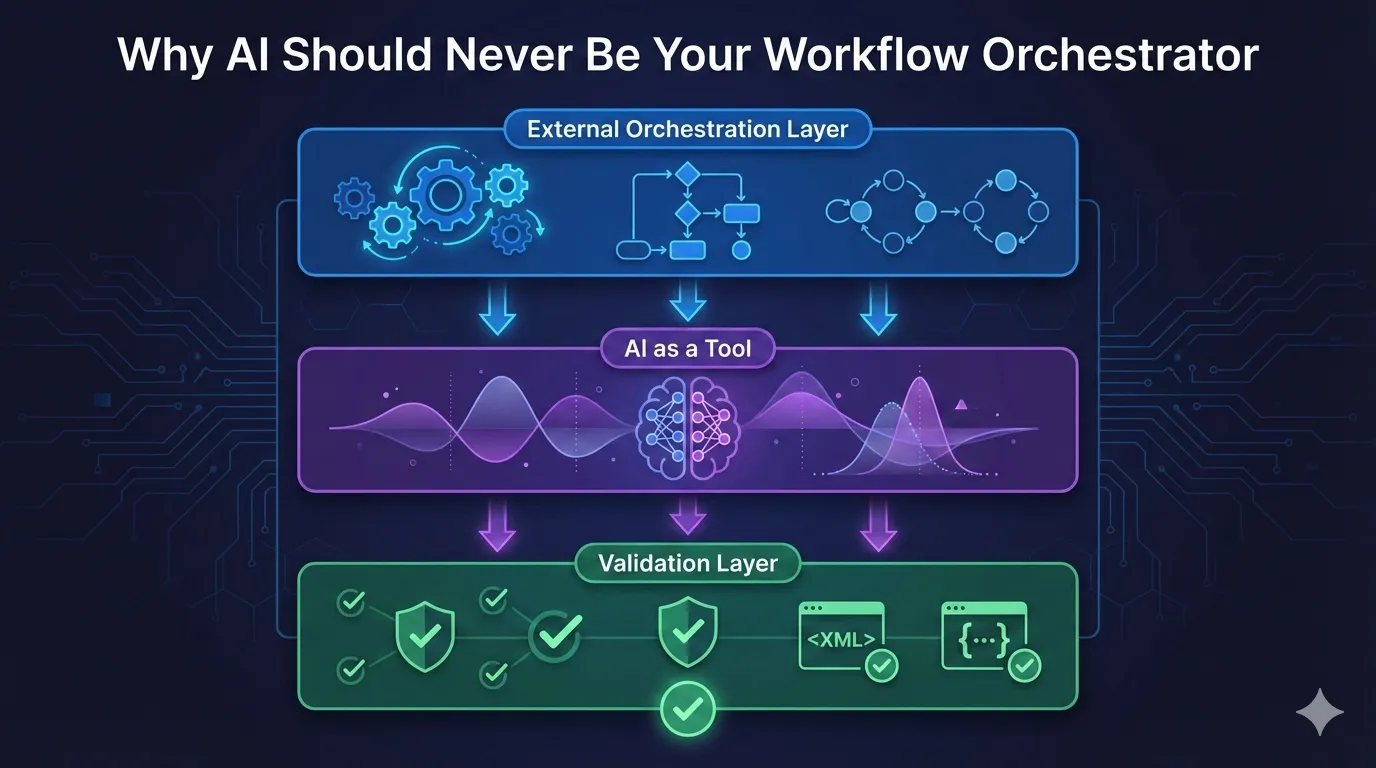
Here’s the insight that changed my approach: workflow orchestration must live outside the AI.
| |
The AI becomes a tool within the workflow, not the orchestrator of it.
This isn’t about distrusting AI. It’s about using each component for what it’s good at:
| Component | Good At | Bad At |
|---|---|---|
| External orchestration | Guaranteed execution order, observability, retry logic | Handling ambiguity, edge cases |
| AI | Understanding context, generating content, judgment calls | Deterministic execution, consistency |
| Validation | Catching deviations, enforcing schemas | Knowing what “right” looks like for novel cases |
Claude Code Hooks: Deterministic Control for AI Workflows
This is where Claude Code’s Hooks system becomes genuinely exciting. Hooks provide what I’ve been describing: deterministic control over AI behavior.
Claude Code’s hooks system enables exactly this: hooks are user-defined shell commands that execute at specific points in Claude Code’s lifecycle. They provide deterministic control over Claude Code’s behavior, ensuring certain actions always happen rather than relying on the LLM to choose to run them.
That’s the key insight: ensuring certain actions always happen rather than relying on the LLM to choose.
Hook Types That Enable Enforcement
SessionStart — Inject context before the AI even begins:
| |
The skill content gets injected into context. The AI doesn’t decide to read it—it’s already there.
PreToolUse — Validate before any action executes:
| |
Your validation script can check: “Has the required prerequisite been completed?” If not, exit with code 2 to block the action.
PostToolUse — Enforce standards after every change:
| |
Every TypeScript edit triggers type checking. The AI can’t skip it.
A Practical Enforcement Pattern
Here’s how I’d enforce a deployment workflow:
| |
The check-deployment-prerequisites.sh script might look like:
| |
Now the AI cannot deploy without completing prerequisites. It’s not a suggestion. It’s enforcement.
The Remaining Gap
Hooks get us most of the way there, but there’s still no native “require this tool call before responding” mechanism. You can’t say “Claude must call the linting MCP tool before any code generation.”
However, you can approximate it:
- SessionStart injects requirements into context
- PreToolUse blocks actions that violate workflow order
- Validation scripts track state and enforce prerequisites
- Exit code 2 provides feedback to Claude about why actions were blocked
Building Automated Validation Systems for AI-Generated Code
Here’s where things get interesting: as the speed of AI code generation or output accelerates, manual review becomes a bottleneck. You need automated validation that understands your architecture.
This isn’t about linting or formatting. Those are syntax-level checks. I’m talking about validating:
- Architecture compliance: Does this new service follow our microservices patterns?
- Dependency constraints: Is this package allowed to import from that layer?
- Design pattern adherence: Are we using the repository pattern correctly?
- Library usage rules: Are we using the approved authentication library, not rolling our own?
The value isn’t in having AI remember these rules (it won’t consistently). The value is in codifying the rules so validation is automated.
A note on spec-driven development: You might think, “I’ll use spec-first approaches and let AI generate everything from specifications.” But specs don’t solve the maintainability problem. You’re still supporting AI-generated code at the end. If that code is unmaintainable—overly complex, poorly structured, or violating your architectural patterns—you’ll be in a world of pain when bugs appear or requirements change. Validation must check not just correctness against specs, but also code quality, maintainability, and adherence to your team’s patterns.
The Meta-Pattern: AI Building Validation for AI
Here’s the evolution I’ve observed:
Phase 1: You write validation scripts manually
| |
Phase 2: You use AI to help write validation scripts
| |
Phase 3: AI maintains validation as architecture evolves
| |
This is the meta-pattern: AI helps build and maintain the validation systems that validate AI-generated code.
Codifying Architectural Rules
The key is making your architectural constraints executable. Here’s a practical example:
| |
Hook this into PostToolUse for Edit operations:
| |
Now the AI cannot violate your package architecture. It will get immediate feedback: “This import violates the feature isolation rule.”
Validation That Evolves With AI Adoption
As AI generates more code, your validation needs shift:
Early AI adoption:
- Focus: Syntax, types, tests
- Tools: Linters, type checkers, test runners
- Scope: Individual files
Scaling AI usage:
- Focus: Architecture, patterns, cross-cutting concerns
- Tools: Custom validation scripts, dependency analyzers
- Scope: Module boundaries, system integration
AI-pervasive development:
- Focus: Business rules, domain invariants, compliance
- Tools: AI-assisted validation, semantic analysis
- Scope: Business logic correctness, regulatory compliance
The pattern: validation moves up the abstraction ladder as AI handles lower-level concerns more reliably.
Practical Validation Beyond Syntax
Here are validation scripts I’ve found valuable:
Database migration safety:
| |
API contract enforcement:
| |
Security boundary validation:
| |
Each script encodes knowledge about your system. The AI doesn’t need to remember these rules—it gets immediate feedback when it violates them.
The Investment Pays Off at Scale
Building validation systems feels like overhead initially. But consider:
- Without validation: You review every AI-generated change manually
- With validation: AI gets instant feedback, you review only what passed automated checks
As AI velocity increases, the ROI of automated validation becomes asymptotic. You’re essentially building a continuous code review system that operates at machine speed.
The humans-and-AI partnership becomes:
- Humans: Define architectural rules and business invariants
- AI: Generates code and helps build/maintain validation systems
- Validation systems: Ensure AI-generated code complies with human-defined rules
- Feedback loop: Violations inform both AI (immediate) and humans (for rule refinement)
When to Use Each Approach
| Scenario | Approach |
|---|---|
| Critical workflows (deployments, financial transactions) | External orchestration with hooks |
| Code quality enforcement | PostToolUse hooks with linters/formatters |
| Architecture compliance | PostToolUse hooks with custom validation scripts |
| Security validation | PreToolUse hooks that block dangerous operations |
| Business rule enforcement | Custom validation scripts in PostToolUse hooks |
| Advisory assistance | Skills and prompts (enforcement optional) |
| Edge case handling | AI judgment with validation layer |
Frequently Asked Questions
Q: Can’t I just write better prompts to ensure AI follows instructions? A: No. LLMs are probabilistic systems. Even the best prompts are suggestions, not guarantees. You need external enforcement mechanisms like hooks to ensure critical workflows execute correctly every time.
Q: What’s the difference between skills and hooks in Claude Code? A: Skills tell Claude what to do and how to do it—they’re like documentation and guidelines. Hooks ensure it happens by providing deterministic control points in the workflow. Skills extend capabilities; hooks provide enforcement.
Q: Do I need hooks for every AI interaction? A: No. Use hooks for critical workflows (deployments, financial transactions, security validation) and quality enforcement (linting, type checking). For advisory tasks, brainstorming, or exploration, skills and prompts are sufficient.
Q: Can hooks completely replace human oversight? A: Hooks provide automated enforcement of known rules and workflows, but human judgment is still essential for architectural decisions, edge cases, and situations requiring contextual understanding.
Q: Should I build custom validation scripts or just rely on standard tools like linters? A: Both. Linters handle syntax and style, but as AI generates more code, you need custom validation for architecture compliance, business rules, and domain-specific constraints. Start with one critical architectural rule (like package isolation or API contract validation), codify it as a script, and expand from there. The investment pays off exponentially as AI velocity increases.
The Shift Left Evolution: From DevOps to AI-Augmented Development
Remember when tech adopted Infrastructure as Code? We shifted validation left—catching issues earlier in the development cycle through automation and testing.
With AI-augmented development, we’re teleporting even further left. We now need automation validation—not just for deployments and releases, but for the AI-generated code itself and the workflows that produce it.
The same shift-left principles apply:
- Deployments: Validate before production (we learned this in DevOps)
- Releases: Validate before deployment (we learned this in CI/CD)
- Code Generation: Validate immediately after the AI writes it (we’re learning this now)
The difference? AI assistance makes implementing these validations simpler. Hooks, skills, and MCP tools give you the building blocks. The architecture just needs to be right: validation lives outside the AI.
The Bottom Line
If you need guarantees that AI follows a workflow, the workflow logic must live outside the AI. Full stop.
Skills and MCP extend capabilities. Hooks provide enforcement. Use them together:
- Skills define what to do and how
- MCP servers provide the tools to do it
- Hooks ensure it actually happens
Start Small
Don’t try to hook everything at once. Start where it matters most:
- Identify your ONE most critical workflow (likely: deployments or production releases)
- Add a single PreToolUse hook to validate prerequisites (tests passed, staging validated)
- Codify ONE architectural rule as a validation script (e.g., package isolation, API contracts)
- Observe the impact for a week—you’ll catch violations you didn’t know were happening
- Expand incrementally to other critical paths (security, data operations, business rules)
- Remember: Don’t hook everything—only what needs guarantees
Stop hoping your AI will follow instructions. Build systems that make compliance deterministic.
About this post: This article was written by Claude (Anthropic’s AI assistant) with guidance and direction from Eric Gulatee. The insights and architectural patterns reflect real-world experiences in building AI-augmented development workflows.
This post is part of a series on building reliable AI-augmented development workflows. See also: LLM Output Requires Validation for validation feedback loops that complement the architectural patterns discussed here.